Skip to content
System Tour

Inside TimeLogic: All 9 Production System Interfaces

Authentic production captures of the TimeLogic platform. Review the operator interfaces, supervisory tools, and automated engines powering our enterprise attendance infrastructure.

SCREEN 01•Terminal Gateway

Attendance Kiosk Station: Secure Device Authentication

The gateway that authenticates any computer or tablet as an authorized on-premise attendance terminal. Restricts attendance logging strictly to company-approved hardware tied to your verified network.

timelogic.app / station-kiosk-loginProduction Capture
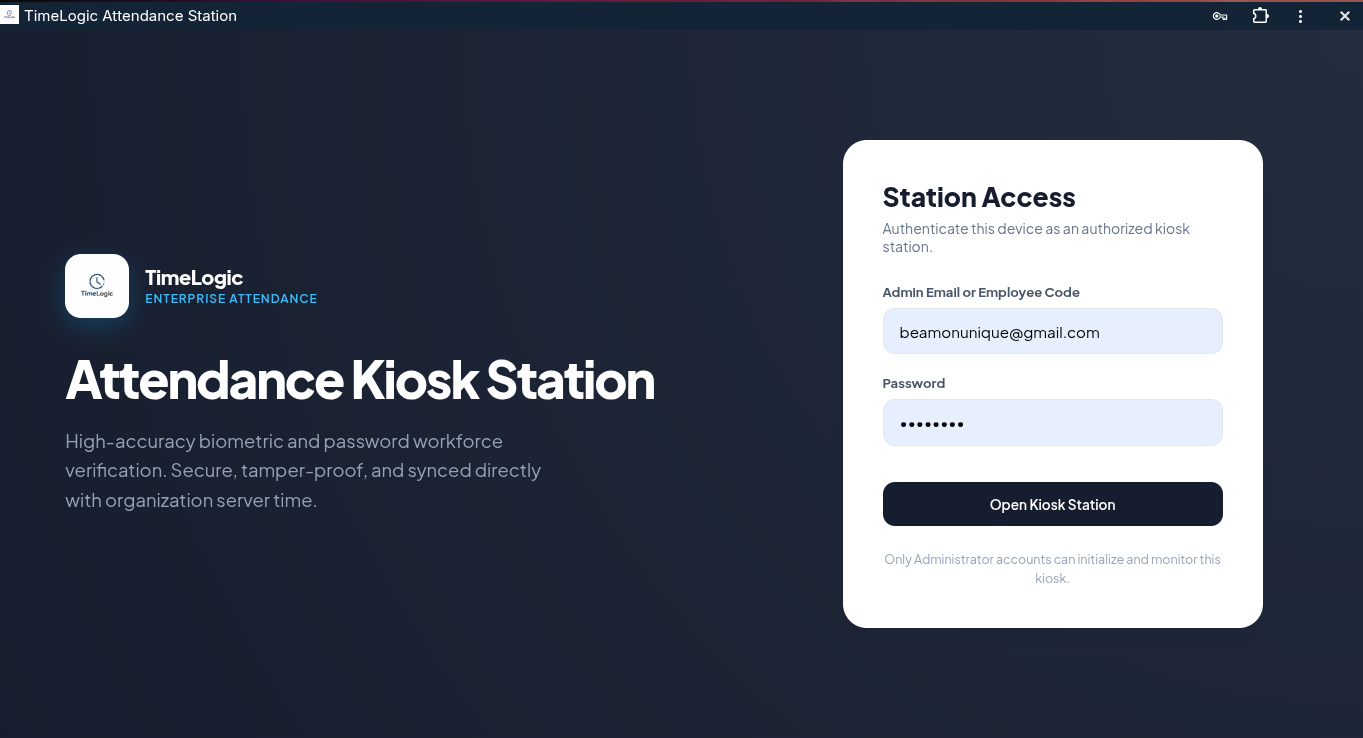
Attendance Kiosk Station: Secure Device Authentication
Operational Capabilities:
Cryptographic device credentials preventing rogue off-site logins.
Direct clock synchronization with organization server time.
Prevents proxy clock-ins by requiring administrator or employee authorization.
Locks kiosk terminals to authorized on-premise locations.
SCREEN 02•Kiosk Touch Interface

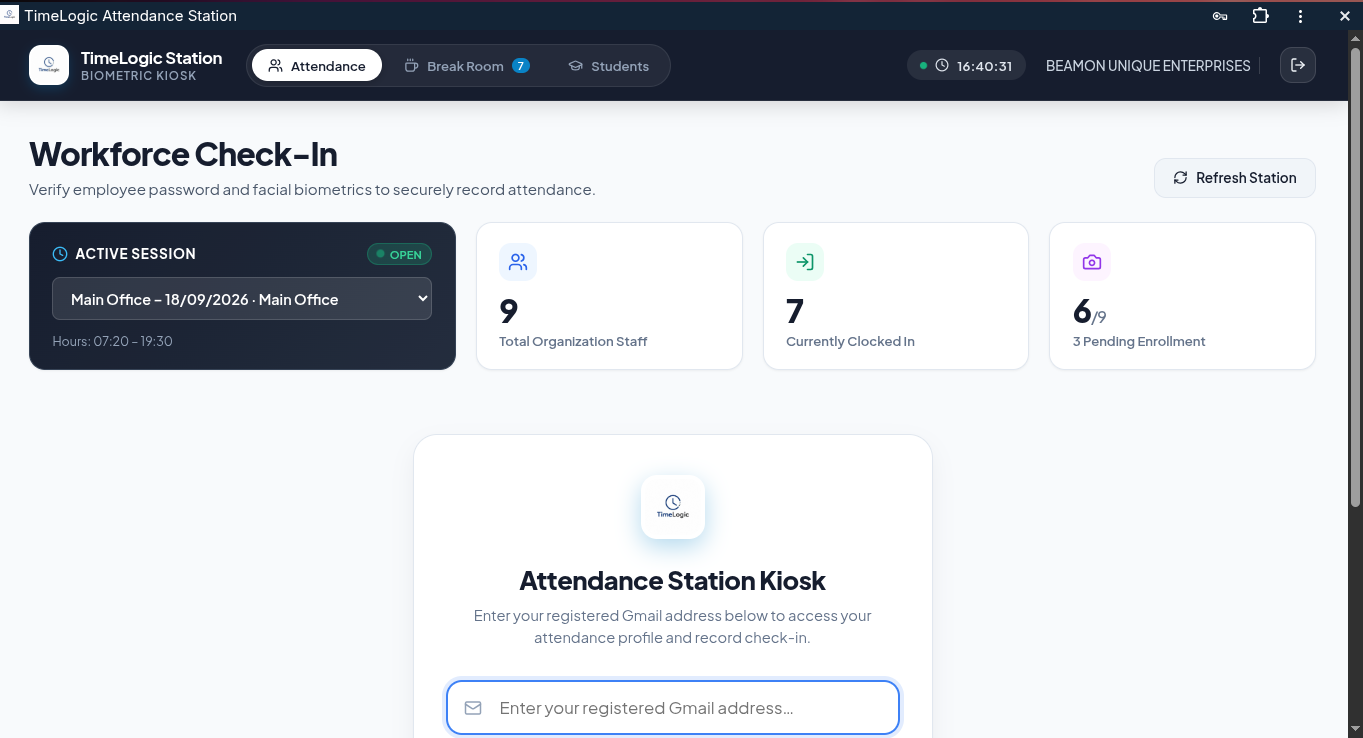
Workforce Check-In: Biometric & PIN Attendance Portal

The primary employee-facing check-in screen. Staff punch in with under 3 seconds per transaction using their authorized employee credentials and facial biometric verification.

timelogic.app / workforce-checkinProduction Capture
Workforce Check-In: Biometric & PIN Attendance Portal
Operational Capabilities:
Displays current active session schedule (e.g. Main Office 07:20 – 19:30).
Tracks total organization staff and live clock-in counts.
Live biometric facial verification status indicator (e.g. 6/9 enrolled).
Instant confirmation feedback with zero duplicate punches.
SCREEN 03•Biometric Identity Engine

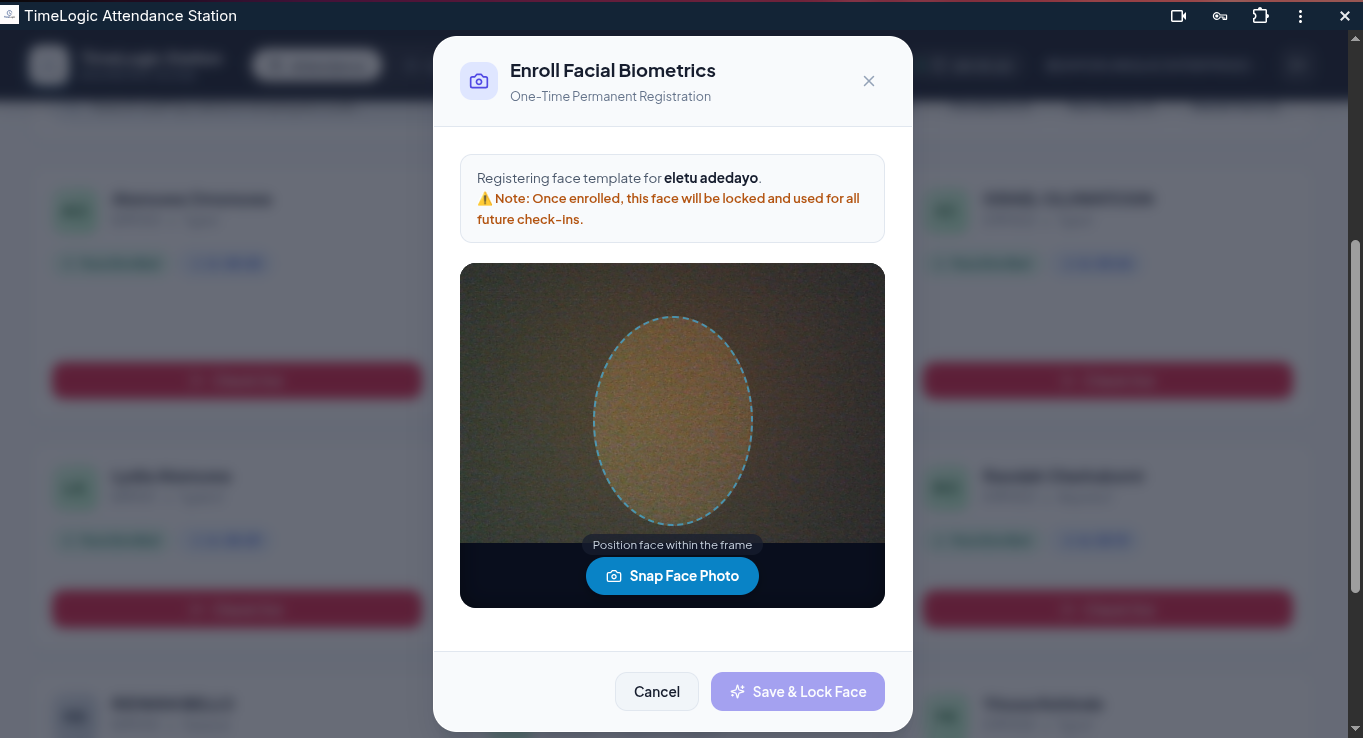
Facial Biometric Enrollment: One-Time Permanent Lock

The dedicated biometric registration terminal used to enroll and permanently bind an employee's facial geometry to their unique employee ID. Once captured within the guided oval alignment frame, the template is locked, preventing impersonation.

timelogic.app / face-biometrics-enrollmentProduction Capture
Facial Biometric Enrollment: One-Time Permanent Lock
Operational Capabilities:
Guided oval alignment overlay with live camera positioning feedback.
Permanent cryptographic locking of face template to employee ID.
Eliminates proxy punches and buddy check-ins with tamper-resistant validation.
Sub-second local facial match during daily workforce check-in sessions.
SCREEN 04•Executive Oversight

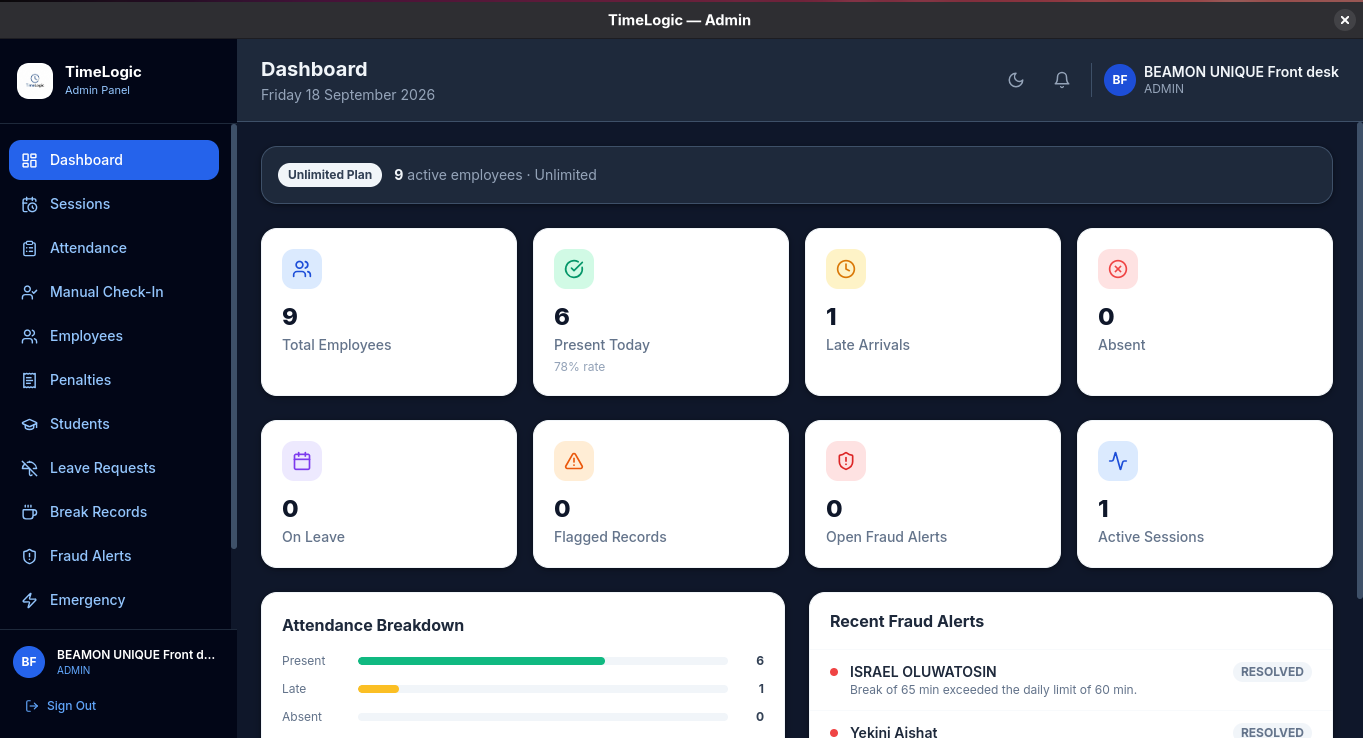
Admin Dashboard: Real-Time Operational Command Center

The central operational interface for organizational administrators. Provides second-by-second visibility into workforce presence rates, active shift sessions, late arrivals, excused leaves, and incoming policy violation alerts.

timelogic.app / admin-dashboardProduction Capture
Admin Dashboard: Real-Time Operational Command Center
Operational Capabilities:
Live presence percentage computed automatically across active personnel.
Visual attendance breakdown differentiating present, late, absent, and on-leave staff.
Integrated live alert feed displaying resolved and open fraud alerts.
Direct navigation to session scheduling, penalties, and break logs.
SCREEN 05•Floor Management

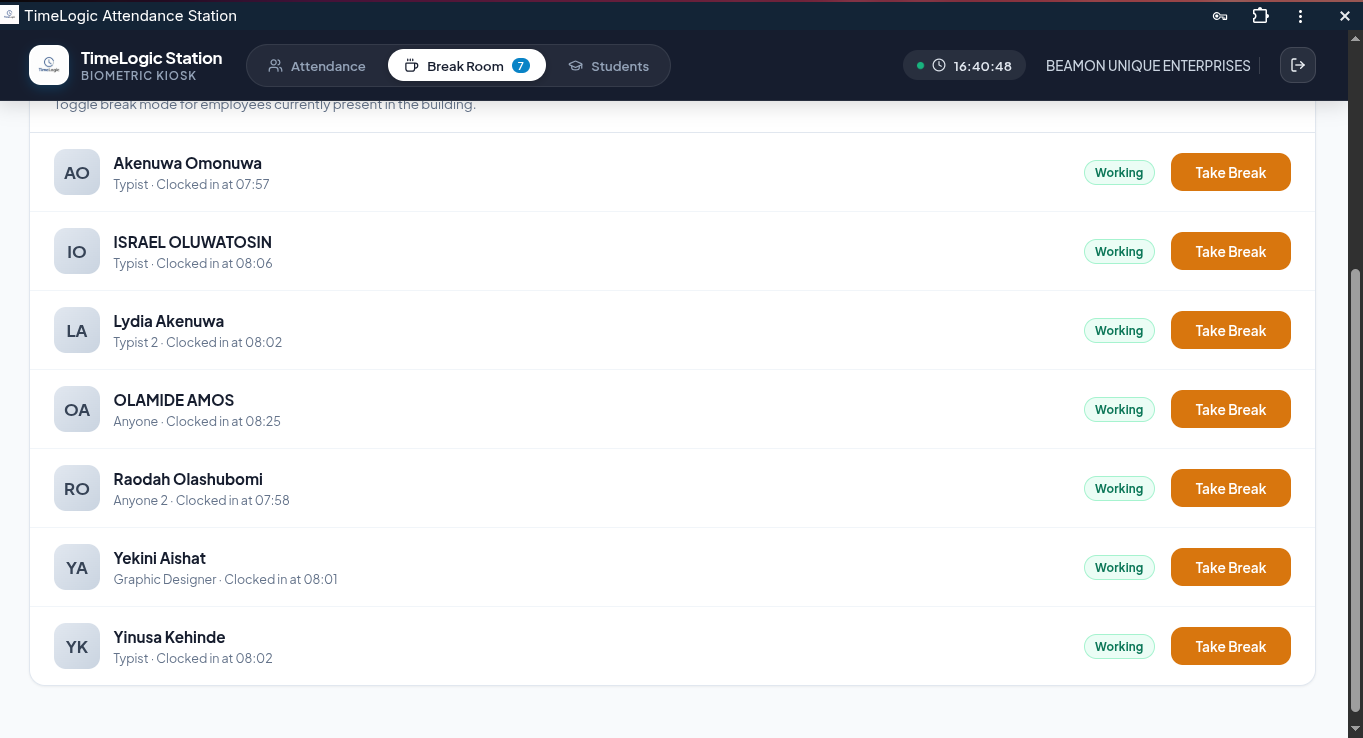
Live Floor Presence: Break Room & Active Staff Monitor

Provides floor managers and supervisors with an instant roster of all present employees and their real-time duty status: whether actively working or currently out on an authorized break.

timelogic.app / break-room-liveProduction Capture
Live Floor Presence: Break Room & Active Staff Monitor
Operational Capabilities:
Live toggle between 'Working' and 'Take Break' for present floor staff.
Exact arrival timestamps (e.g., clocked in at 07:57, 08:06).
Department-level visibility into staff availability.
Eliminates unmonitored disappearances from work stations.
SCREEN 06•Security Auditing

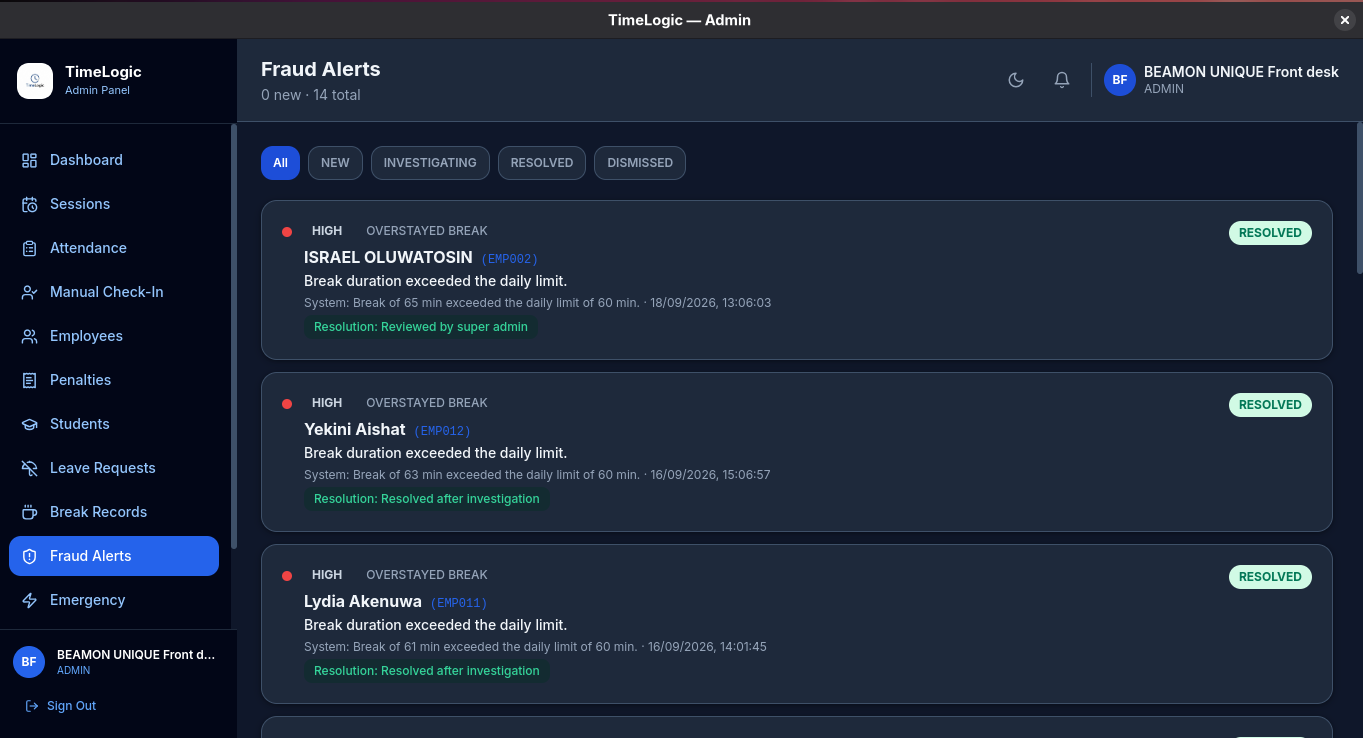
Fraud Alerts Engine: Automated Policy Violation Tracking

The automated intelligence layer that detects time theft and policy breaches. Any employee who overstays their break or attempts an unverified punch triggers an immediate alert with structured resolution workflows.

timelogic.app / fraud-alertsProduction Capture
Fraud Alerts Engine: Automated Policy Violation Tracking
Operational Capabilities:
Severity tag and violation category (e.g., HIGH · OVERSTAYED BREAK).
Second-accurate timestamp and system explanation log.
Structured HR resolution lifecycle (New, Investigating, Resolved, Dismissed).
Permanent audit trail with supervisor notes for labor compliance.
SCREEN 07•Policy Auditing

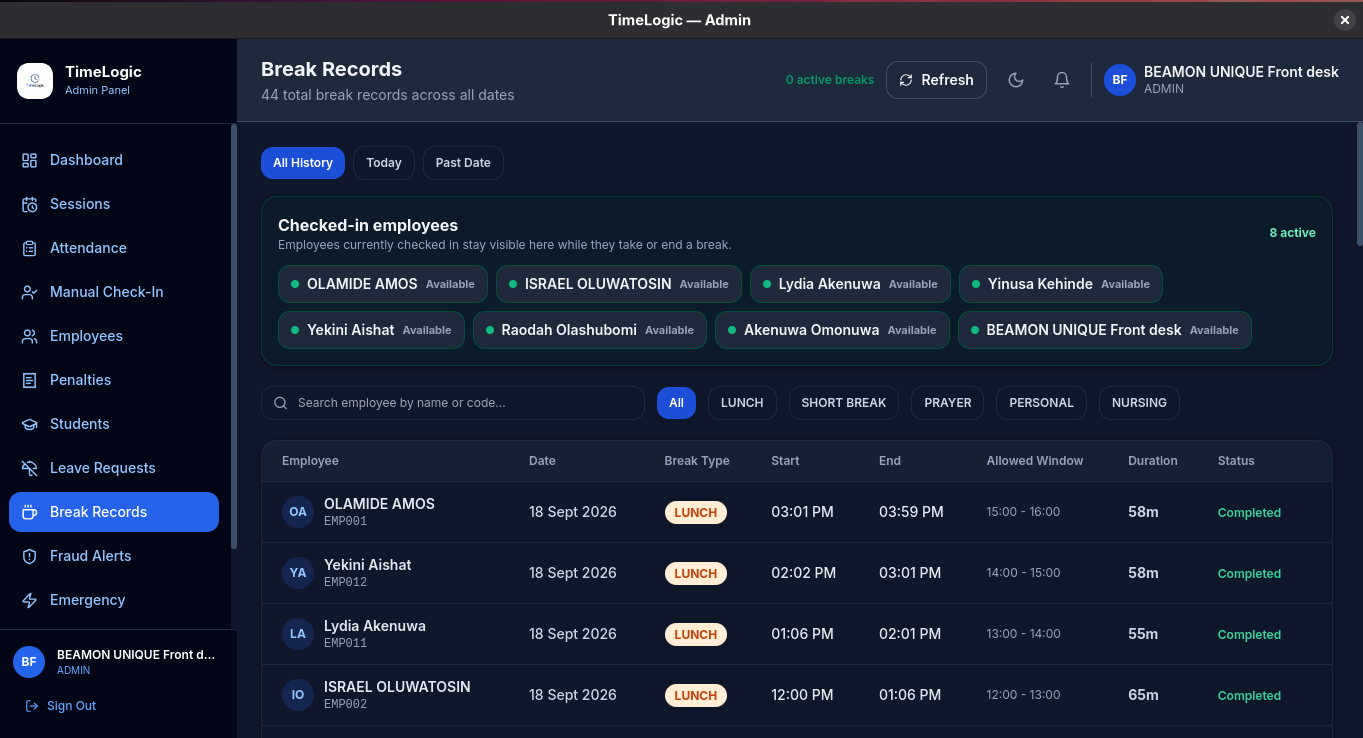
Break Records: Granular Activity & Window Auditing

A detailed audit log of every break taken across the organization. Breaks are categorized by type with allowed time windows and exact duration tracking in minutes.

timelogic.app / break-recordsProduction Capture
Break Records: Granular Activity & Window Auditing
Operational Capabilities:
Granular categories: Lunch, Short Break, Prayer, Personal, and Nursing.
Allowed time window enforcement (e.g., 12:00 – 13:00, 15:00 – 16:00).
Exact duration tracking in minutes (e.g. 58m vs 65m).
Automated status classification (Completed vs Overdue/Overstayed).
SCREEN 08•Cohort Roster

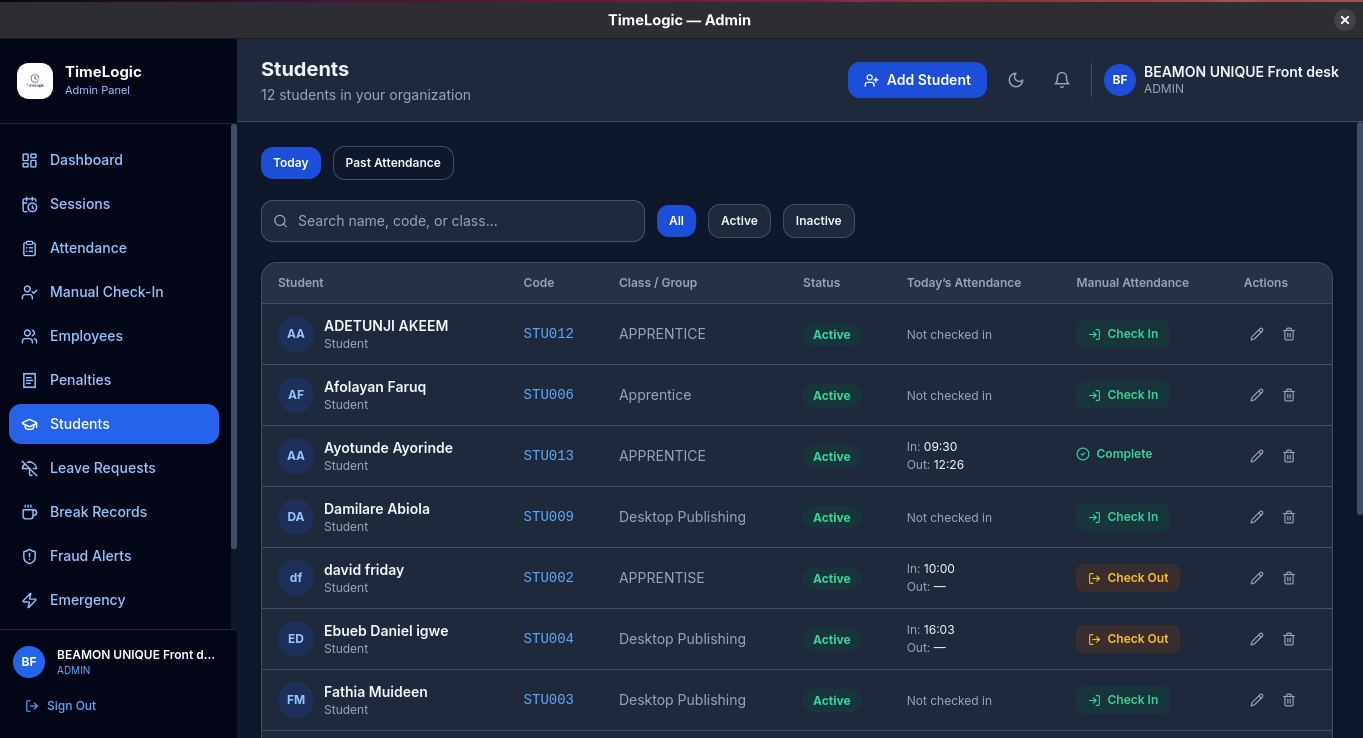
Students & Apprentices: Cohort Attendance Management

Specialized management portal for training institutes, apprenticeships, and vocational workshops. Groups students by cohort and tracks their daily attendance and completion records.

timelogic.app / student-attendanceProduction Capture
Students & Apprentices: Cohort Attendance Management
Operational Capabilities:
Student tracking codes (e.g., STU002, STU012) and class assignments.
Live daily status tracking with arrival and departure timestamps.
Manual check-in and check-out tools for supervisors.
Cohort filtering by class, group, active status, or name search.
SCREEN 09•Payroll Automation

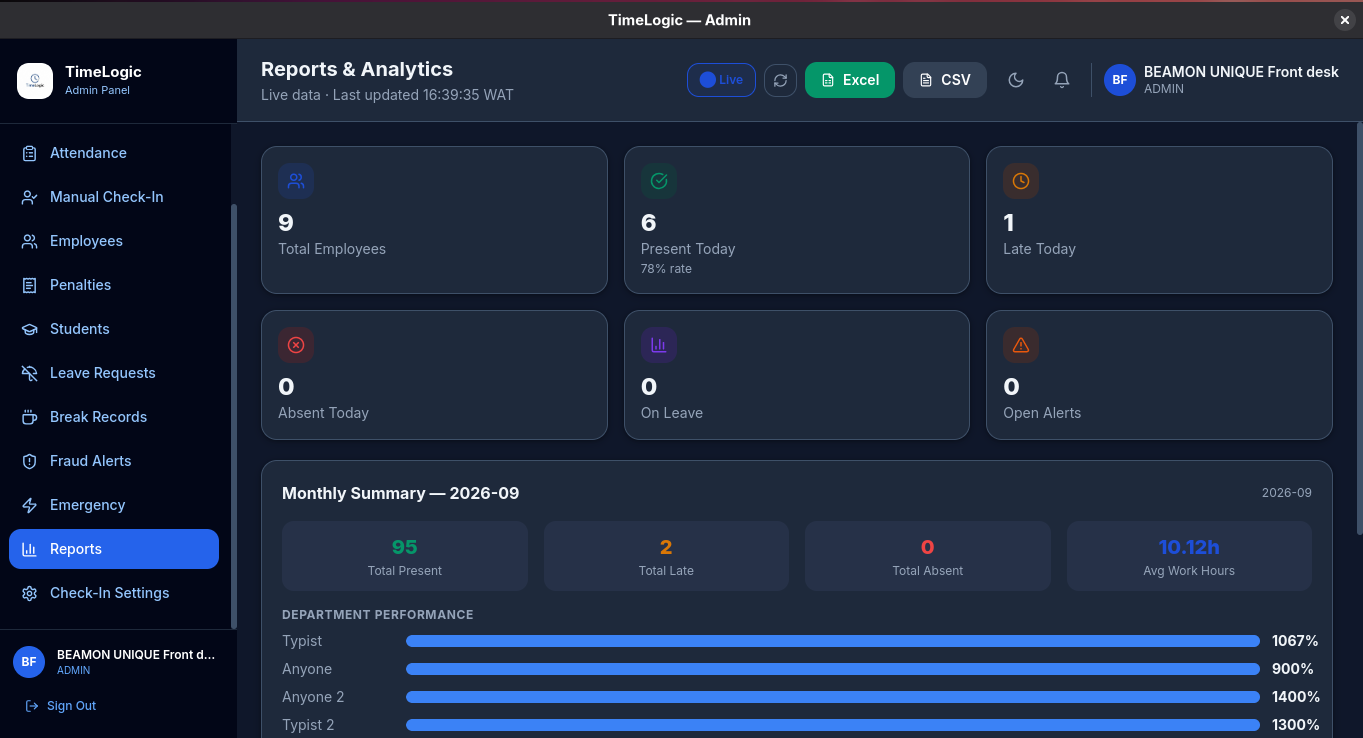
Reports & Analytics: One-Click Excel & CSV Exports

The automated analytics and reporting engine that compiles raw punch data into monthly performance summaries and direct 1-click Excel/CSV spreadsheets ready for payroll processing.

timelogic.app / reports-analyticsProduction Capture
Reports & Analytics: One-Click Excel & CSV Exports
Operational Capabilities:
Instant one-click export directly to Microsoft Excel (.xlsx) and CSV.
Monthly aggregated metrics: Total Present, Total Late, and Average Work Hours.
Department performance benchmarks and punctuality rankings.
Eliminates hours of manual payroll calculation and human errors.

Schedule a Live On-Premise Demonstration

Speak directly with our technical deployment team to see these screens functioning on your company network.